The best dark themes for WordPress in 2026 are Signify Dark, Gutenify Business Dark, Royce, Monster Dark, and Dark Mode Blog. Each one is free, lightweight, and suits a different type of site. And if you already like your current theme, you can simply add dark mode and accessibility tools to it with the Darklup plugin instead of switching themes.
Picking a WordPress theme is easier than most people think. WordPress already gives you thousands of ready-made designs. The hard part is choosing the right one. Lately, one style keeps winning visitors over: dark themes. A good dark design is easier on the eyes, helps people read longer, saves battery on phones, and looks clean and modern.
One thing many “best theme” lists get wrong is recommending themes that are no longer updated. An old, unmaintained theme can break with new WordPress versions and open security holes. For this guide, we picked only dark themes that are still being updated in 2026, and we tested each one ourselves. At the end, we also show you a faster option that works on any site: turning your existing theme dark with Darklup, which now also adds a full accessibility panel for your visitors.
Key Takeaways
- Dark themes reduce eye strain, save battery, and give your site a modern look
- Our top 5 tested dark themes are all free and beginner-friendly
- You do not need a new theme to get dark mode. Darklup adds it to any theme
- Darklup now includes 11 accessibility tools, so visitors can adjust their site to fit their needs
Best Dark Themes for WordPress at a Glance
| Theme | Best For | Type | Page Builder Friendly |
| Signify Dark | Corporate and blog sites | Free | Customizer |
| Gutenify Business Dark | Block sites with ready templates | Free | Gutenberg / Gutenify |
| Royce | Modern, multipurpose sites | Free | Block editor (FSE) |
| Monster Dark | Business and WooCommerce | Free | Yes |
| Dark Mode Blog | Bloggers and writers | Free | Yes |
Why Use a Dark Theme on Your WordPress Site?
Dark designs are popular for good reasons. Here is what they do for you and your visitors:
- Less eye strain: Dark backgrounds are easier on the eyes in low light, so that people can read longer.
- Better focus: A dark page reduces glare, helping visitors focus on your content.
- Longer battery life: On OLED and AMOLED phone screens, dark pixels use less power.
- Content that stands out: Photos, videos, and bright accent colors pop on a dark background.
- A modern look: Dark interfaces feel sleek and help your brand look up to date.
- User choice. Many people simply prefer dark mode, and offering it keeps them on your site longer.
5 Best Dark Themes for WordPress in 2026
The WordPress theme directory has thousands of options. To save you time, here are five dark themes that are still maintained, tested, and ready to use.
1. Signify Dark — Best for Corporate and Blog Sites
Signify Dark is a free dark theme made for blogs and corporate websites. It is a child theme of the popular Signify theme, so it retains a full set of premium-style features while wrapping them in a sleek dark color scheme.
What makes it handy is the ready-made homepage sections you can enable in the Customizer, like a hero area, slider, services, testimonials, portfolio, and featured content. That lets you build a professional, good-looking site without having to piece everything together yourself. It is responsive across all screen sizes and, with 4,000+ active installs and a 2026 update, it is both popular and well-maintained.
Best for: Corporate sites and blogs that want built-in homepage sections.
2. Gutenify Business Dark — Best for Block Sites with Ready Templates
Gutenify Business Dark is another modern, block-based theme that shines when paired with the free Gutenify builder plugin. That combo gives you ready-made templates and patterns you can drop in and customize so that you can go from a blank site to a finished design without code. You can change the layout, fonts, and colors of any page right in the block editor.
Best for: Business and multipurpose sites that want a head start with templates.
3. Royce — Best for Modern, Multipurpose Sites
Royce is a modern dark theme built for Full Site Editing, so you design everything in the WordPress block editor with no code. It comes with 19 ready-made color styles, built-in dark mode, and a mobile-friendly layout, which makes it a strong pick for agencies, businesses, bloggers, and landing pages alike.
Because it works with the block editor and the free Plover Kit, you can build clean, eye-catching pages quickly and switch the whole look with a single click. It is also translation-ready and supports right-to-left languages. Best of all, it is actively maintained, with its most recent update landing in 2026.
Best for: Anyone who wants a flexible, up-to-date dark theme built on the block editor.
4. Monster Dark — Best for Business and WooCommerce
Monster Dark is made for online businesses and stores. It is mobile-first, so your site looks sharp on phones, where most traffic now comes from. You do not need any coding to customize it. Despite the “business” label, it also suits education, fashion, magazines, travel, and more.
Best for: Business websites and WooCommerce stores.
5. Dark Mode Blog — Best for Bloggers and Writers
If your content comes first, Dark Mode Blog gives readers a clean, distraction-free experience. Its minimalist design puts your writing front and center. It is also very light, which means faster page load times, a lower bounce rate, and better SEO. For writers who want both looks and speed, it is an easy pick.
Best for: Bloggers who want readability, speed, and a clean, dark look.
Don’t Want to Switch Themes? Add Dark Mode and Accessibility with Darklup
Here is the shortcut many people miss. You do not have to give up a theme you already like just to get dark mode. Darklup adds a dark version to any WordPress theme in a few clicks, and in its latest version, it does much more than just dark mode.
Darklup is now a dark mode and accessibility plugin. That means it does two big jobs at once, like it makes your site dark, and it lets every visitor adjust your site to suit their own needs.
How the Darklup Accessibility Module Works
Picture a small floating button on your site. A visitor clicks it or presses Alt + A on the keyboard, and a simple panel slides open. Inside are easy-on/off toggles that your visitor can control themselves. No account, no help needed. Their choices are saved in their browser, so the site remembers them on every page and every visit.
The panel includes 11 accessibility tools:
- Dark Mode (free): switches the site to dark colors for night reading.
- Bigger Text (free): makes text larger without breaking your layout.
- Contrast (free): boosts color contrast, making text easier to read.
- Readable Font: swaps in a clearer, easier-to-read typeface.
- Highlight Links: makes links stand out so they are easy to find.
- Stop Animations: pauses movement for people who find it distracting.
- Monochrome: removes color and shows the page in grayscale.
- Font Weight: makes text bolder and easier to track.
- Align Text: changes text alignment for more comfortable reading.
- Reading Mask: highlights one line at a time so people do not lose their place.
- Hide Images: removes images to cut clutter and help focus.
You stay in control, too. From the Darklup dashboard, you choose which tools appear, set the panel colors to match your brand, and pick where the button sits. The whole panel is also keyboard-friendly, like Tab moves between tools, Enter or Space turns one on or off, and Esc closes it. The design follows WCAG 2.1 guidelines, the global standard for web accessibility, which helps make your site more usable for people with visual, motor, or focus-related needs.
Why Dark Mode Plugins Matter
When you add a dark theme, you help people who like dark mode. When you add Darklup, you help everyone, for example, night readers, people with low vision, people who get distracted by motion or color, and people who browse using a keyboard. That is a bigger audience, longer visits, and a friendlier site, with no rebuild required.
It is also light. The accessibility code only loads when you turn the panel on, so it does not slow your site down. It works with any theme and with major builders like Elementor, Divi, and WPBakery.
Set Darklup in 3 Simple Steps
- Install Darklup: Download the free or Pro version from the WordPress plugin directory. Takes about a minute.
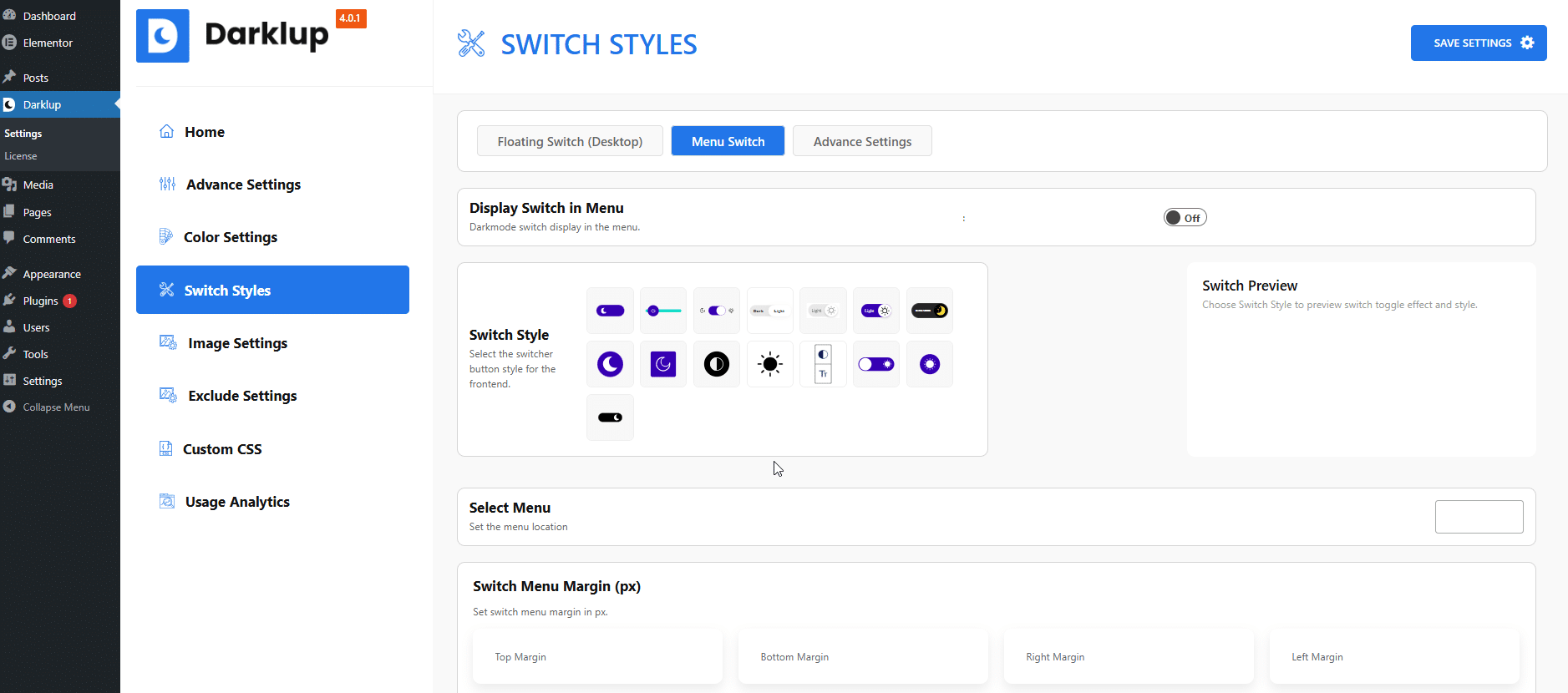
- Turn on the Accessibility Switch: Go to the Darklup dashboard, open Switch Styles, choose the Floating Switch, pick the Accessibility icon, and save.
- Customize and go live: Choose your panel colors, pick which tools to show, and publish.
🔥You can start for free on WordPress.org and unlock all 11 tools with Darklup Pro.
🎁Bonus: How to Choose the Right Dark WordPress Theme
To pick the best dark theme for your site, think about:
- Active updates: Choose a theme that is updated regularly. A theme left untouched for a year or more can break with new WordPress versions and create security risks.
- Purpose: Match the theme to your goal: blog, business, store, or portfolio.
- Speed: Lighter themes load faster, which helps both visitors and SEO.
- Readability: Good dark themes use dark gray, not pure black, so text is comfortable to read.
- Compatibility: Check that it works with your page builder and key plugins.
- Customization: Make sure you can change colors, fonts, and layout to fit your brand.
- Flexibility: If you like your current theme, a plugin like Darklup is the simpler route and adds accessibility, too.
Choose Your Best Dark Theme & Start with Darklup
The right theme makes your WordPress site easier to use, nicer to look at, and friendlier on the eyes. Any of the five dark themes above is a solid, well-maintained choice, depending on your needs.
But you do not have to switch themes at all. With Darklup, you can add dark mode and 11 accessibility tools to your existing theme. Your visitors get to browse the way that works best for them, and your site reaches more people. Either path is a good one. The plugin route is just the fastest. Don’t wait, and get started with Darklup today.
And if you want to read more useful blogs like this, don’t forget to subscribe to our blog page. Stay tuned!
Frequently Asked Questions
What are the best dark themes for WordPress?
The best free, still-updated dark themes are Signify Dark, Gutenify Business Dark, Royce, Monster Dark, and Dark Mode Blog. Each fits a different use, from blogs to online stores. If you would rather keep your current theme, the Darklup plugin adds dark mode to any design.
Can I add dark mode without changing my theme?
Yes. Darklup automatically adds a dark version to your existing theme in a few clicks, so you do not need to switch designs to offer dark mode.
What is the Darklup accessibility panel?
It is a floating menu that your visitors can open to adjust your site themselves. It includes 11 tools such as dark mode, bigger text, higher contrast, a reading mask, and more. Their settings are saved in their browser for the next time they visit.
How do I know if a dark theme is still maintained?
On the theme’s WordPress.org page, check the “Last updated” date. If it was updated in the last few months, it is actively maintained. If it has not been touched in over a year, look for a newer option.
Is a dark theme good for SEO?
Indirectly, yes. Search engines reward fast, easy-to-use sites. A light dark theme can speed up your pages, lower your bounce rate, and keep people reading, which are all good signals.
Are dark themes better for the eyes?
In low light, dark themes usually reduce eye strain and make reading more comfortable for longer periods. They can also lower blue light at night.
Do dark themes use less battery?
On phones with OLED or AMOLED screens, yes. Dark pixels use less light, which saves power. On older LCD screens, the savings are smaller.
Does Darklup slow down my website?
No. The accessibility code only loads when you turn the panel on. If it is off, there is no extra weight on your site.