Dark mode is no longer just a design trend. Many website visitors now expect a light and dark mode option, especially when reading at night, browsing on mobile devices, or using operating system-level dark mode. For WordPress site owners, this creates a simple question of which dark mode plugin should you use?
If your website is WordPress-based, consider Darklup or WP Dark Mode. Both plugins help you add a dark theme switch to a WordPress website without custom coding. However, they are not built in exactly the same way.
In this blog post, we will determine which plugin is more flexible for different user types. Then, as a customer, it will be helpful for you to make an immediate decision. This Darklup vs WP Dark Mode comparison covers features, pricing, usability, accessibility, performance considerations, and real use cases to help you choose the right plugin for your website.
What Is a WordPress Dark Mode Plugin?
WordPress dark mode plugin lets visitors switch your website from a light interface to a darker interface. Instead of manually redesigning your entire theme, the plugin adjusts backgrounds, text, buttons, links, forms, images, and other visual elements.
If you want the best-performing dark mode plugin, it should do more than just invert colors. It should keep text readable, preserve brand colors where possible, avoid breaking images, work on mobile, respect user preferences, and avoid adding unnecessary load to your website. Not only is it compatible, but it also provides advanced Accessibility support for people with disabilities or special needs. Let’s check what modern dark mode features right now offer:
| Feature | Why It Matters |
| Frontend dark mode | Allows visitors to switch your public website to dark mode |
| Backend/admin dark mode | Makes the WordPress dashboard easier to use in low light |
| OS-based mode | Follows the visitor’s device-level light/dark preference |
| Time-based mode | Turns dark mode on automatically during selected hours |
| Custom color settings | Helps preserve brand identity and readability |
| Image adjustments | Prevents logos, icons, and product images from looking wrong |
| WooCommerce support | Helps online stores keep product pages readable |
| Accessibility options | Improves usability for visitors with different visual needs or who have any sort of disabilities |
The CSS prefers-color-scheme media feature is also widely used to detect whether a user has requested a light or dark theme through their operating system or browser settings.
Darklup Dark Mode and Accessibility Plugin Overview
Darklup is considered the best WordPress dark mode and accessibility plugin developed by WPCommerz. Darklup focuses on smart dark mode generation, visual customization, frontend/backend support, WooCommerce compatibility, and advanced accessibility features. That makes it the number one choice and the only dark mode solution for WordPress that includes exclusive accessibility features.
According to this WordPress.org plugin listing, Darklup version 4.0.0 includes a built-in accessibility panel, dynamic color mode, frontend dark mode, backend dark mode, time-based mode, OS-based mode, floating switches, image optimization, keyboard shortcut support, caching exclusion, visitor preference memory, and a lot of exclusive features to explore.
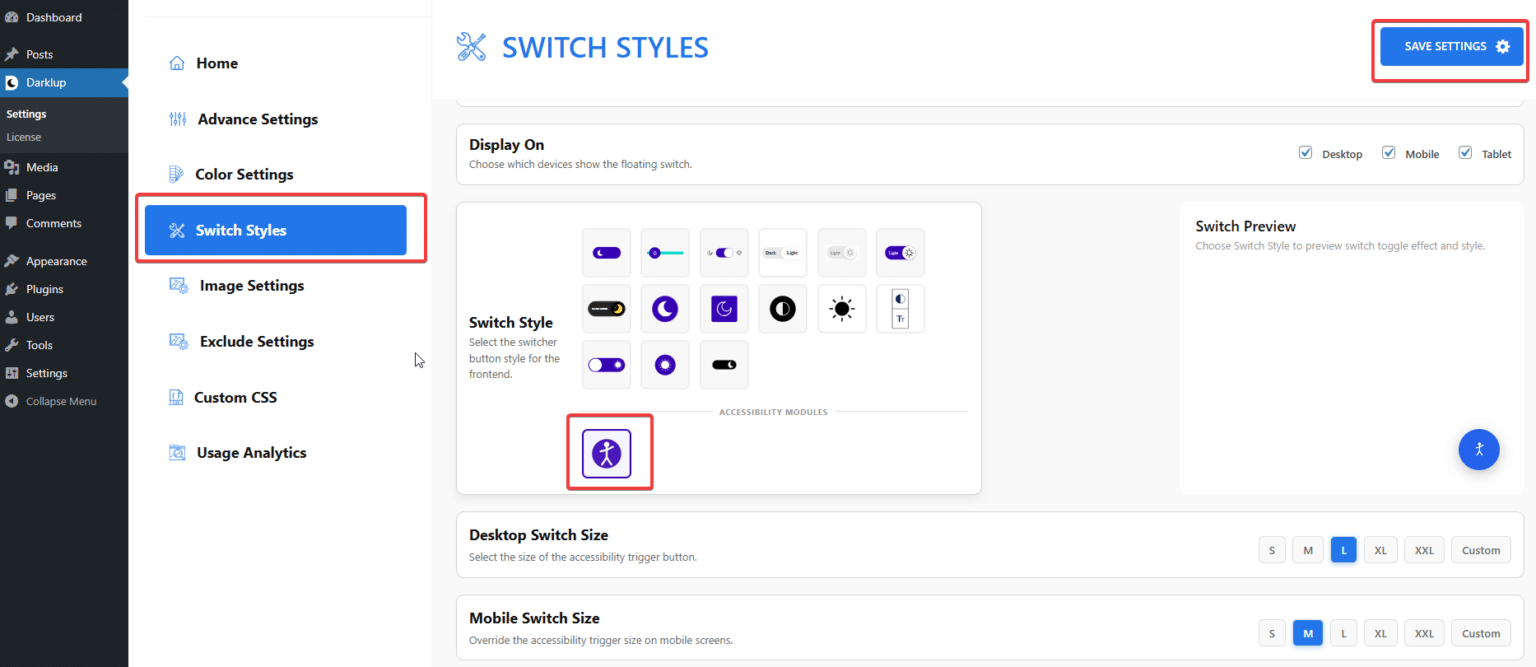
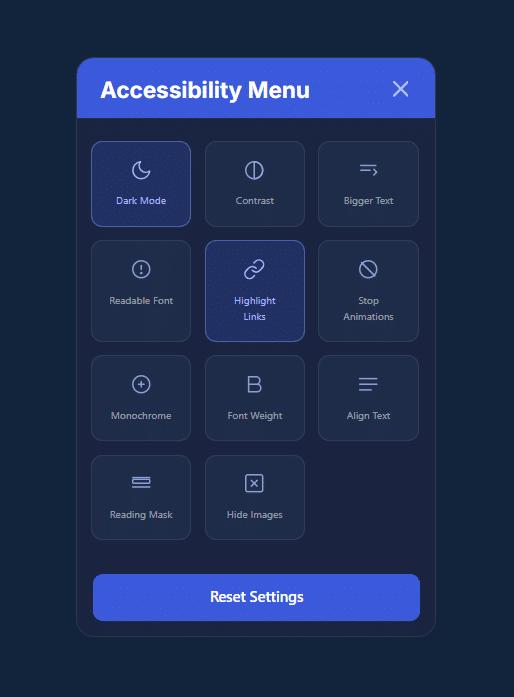
Darklup’s newer positioning is especially important because it is no longer just a dark mode plugin. Version 4.0.0 added an accessibility switch with modules such as contrast control, bigger text, readable font, highlight links, stop animations, monochrome, font weight, reading mask, and hide images.
Darklup Key Takeaways
Darklup is best for WordPress site owners who want dark mode, accessibility controls, greater control over dark mode intensity, WooCommerce compatibility, and smart color handling that prevents the site from looking broken. That means an all-in-one dark mode and accessibility solution that seeks out and secures the most advancement right away.
WP Dark Mode Plugin Overview
WP Dark Mode is another established WordPress dark mode plugin developed by WPPOOL. WP Dark Mode includes features such as a floating dark mode switch, default dark mode, OS-aware mode, admin panel dark mode, color presets, user preference memory, device-wise toggle, and more.
WP Dark Mode Key Takeaways
WP Dark Mode is best for users who want a dark mode plugin with many switch styles and OS-based dark mode.
| Feature | Darklup | WP Dark Mode | Key Difference / Notes |
| Dynamic Dark Mode | ✅ Yes | ❌ No | Only Darklup supports dynamic switching |
| Frontend dark mode | ✅ Yes | ✅ Yes | Both support frontend dark mode |
| Accessibility Panel | ✅ Yes | ❌ No | Darklup includes an accessibility panel; WP Dark Mode does not |
| Accessibility Modules | ✅ Yes | ❌ No | Darklup includes 12+ accessibility modules; WP Dark Mode does not |
| Switch For Different Devices | ✅ Yes | ✅ Yes | Darklup allows device-specific switching |
| Dark Mode for WooCommerce | ✅ Yes (Pro) | ✅ Yes (Pro) | Both support WooCommerce dark mode in Pro version |
| Usage Analytics & Email Report | ✅ Yes (Pro) | ✅ Yes (Pro) | Both provide analytics in Pro version |
| Background Image Overlay | ✅ Yes | ❌ No | Only Darklup can overlay background images in dark mode |
| Custom CSS Support | ✅ Yes (Pro) | ✅ Yes (Pro) | Both allow custom CSS in Pro version |
| Works on all devices | ✅ Yes | ✅ Yes | Fully responsive for all devices |
Insights of Darklup vs WP Dark Mode
Darklup: Superior for full customization, branding, device-specific control, login/register pages, backend presets, floating switch, background overlays, and exclusive accessibility panel.
WP Dark Mode: Simpler, basic dark mode features; advanced features like time-based mode for frontend or admin presets require Pro.
Darklup vs WP Dark Mode Feature Comparison
Choosing the right dark mode plugin for WordPress can make a big difference in your website’s user experience, readability, and branding. It affects accessibility, performance, and even engagement. With multiple plugins available, it’s important to understand how each handles setup, design control, accessibility, performance, WooCommerce support, and pricing.
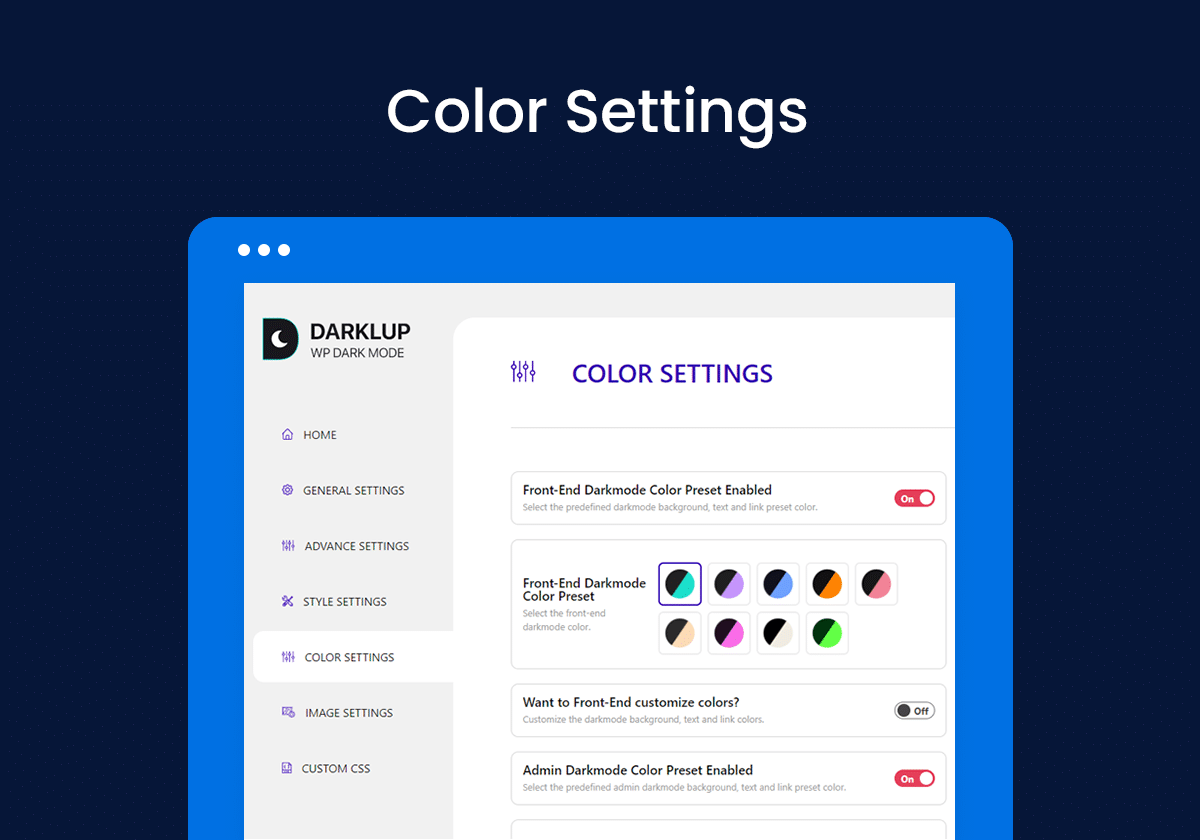
In this feature comparison, we break down six key areas to help you make an informed decision. Whether you prioritize smart color handling, OS-aware defaults, accessibility controls, or WooCommerce compatibility, this guide highlights the strengths and limitations of Darklup and WP Dark Mode.
You can analyze this review to choose the best solution that fits your website’s needs, audience expectations, and SEO-friendly dark mode requirements.
1. Ease of Setup
Both plugins are beginner-friendly. You can install either plugin from WordPress.org, activate it, and enable dark mode without writing code.
Darklup is useful for users who want a guided dark mode setup with smart color handling. Its dynamic color mode analyzes website elements and applies suitable dark colors to backgrounds, text, buttons, and images.
WP Dark Mode also offers a simple setup process. It can automatically show light or dark mode based on the visitor’s operating system preference, which is helpful for users who already use device-level dark mode.
2. Design and Color Control
This is one of the most important parts of any dark mode plugin. Poor dark mode can damage your design by making text unreadable, washing out images, or breaking brand colors.
Darklup offers dynamic color mode, dark mode intensity, background image overlay, custom color options, link hover color, border color, image opacity, and logo replacement in dark mode.
WP Dark Mode offers color presets, custom preset creation, brightness controls, custom CSS, image/video replacement, and multiple dark theme styles in its premium plans.
3. Accessibility
Dark mode should not only look good. It should also be readable. A common mistake is assuming that dark mode is automatically accessible. It is not. A dark background with low-contrast gray text can be harder to read than a light theme. Proper contrast matters. WCAG Level AA requires a contrast ratio of at least 4.5:1 for normal text and 3:1 for large text.
Darklup now has a stronger accessibility angle because version 4.0.0 includes a built-in accessibility panel. Visitors can adjust contrast, increase text size, use a readable font, highlight links, stop animations, and save preferences across visits.
WP Dark Mode also supports accessibility-related functionality, including keyboard shortcut support, URL/domain parameter toggling, and recent fixes for ARIA support and keyboard navigation.
Winner: Darklup, if accessibility controls are a major priority. WP Dark Mode is still competitive in terms of keyboard and screen reader improvements.
4. Performance
Dark mode plugins can affect performance if they load too many scripts, apply heavy visual transformations, or conflict with caching.
Darklup includes caching exclusion and has a recent changelog note mentioning performance and stability improvements.
WP Dark Mode also includes caching exclusion and additional performance settings in premium plans.
For a fair performance comparison, do not rely only on generic claims. Test both plugins on your own site using:
- PageSpeed Insights
- Chrome Lighthouse
- GTmetrix
- WebPageTest
- Real mobile testing
- Staging-site plugin conflict testing
5. WooCommerce Support
If you run an online store, dark mode must handle product images, variation buttons, add-to-cart buttons, checkout forms, coupons, notices, and product category pages.
Darklup includes WooCommerce support and lets users control where dark mode appears, including products and categories in the Pro version.
WP Dark Mode also supports WooCommerce use cases, including excluding WooCommerce products and categories from the premium.
6. Pricing
Pricing changes often, so always check the official pricing pages before buying.
Darklup’s current pricing includes annual plans starting at $29 for 1 site, with Business and Ultimate annual options. Its lifetime plans include $49 for 3 sites, $129 for 100 sites, and $199 for 1000 sites, based on the current pricing page.
WP Dark Mode currently lists a Personal 1-site annual plan at $59/year and a 2-year option at $99 every 2 years, with site tiers for Personal, Business, Agency, and Enterprise.
Winner: Darklup is a more affordable and advanced option than the lifetime-value option. WP Dark Mode may still suit users who prefer its larger ecosystem and premium feature set, but it is a bit expensive for the general user base.
Why Darklup is the Clear Winner for Your Website
Your website users expect a smooth, readable dark mode, but most plugins rely on crude color inversion that can break complex designs and damage brand consistency. Darklup solves this with a Dynamic Color Mode Algorithm that uses real WCAG 2.0 color science, not simple inversion tricks. Every color transformation is intelligent and context-aware, preserving readability and brand identity while adjusting light and dark colors appropriately.
Key advantages of Darklup
- Intelligent Color Handling: Custom darkening intensity preserves gradients, transparent colors, CSS variables, and inline styles.
- Theme and Plugin Compatibility: Works automatically with custom-coded sites, Elementor, and premium WordPress themes.
- Real-Time Transformation: Dynamically transforms AJAX content, modals, and lazy-loaded elements without page reloads.
- Performance Optimized: Thousands of elements transform in milliseconds with negligible impact on load time.
- Automatic Accessibility Compliance: Maintains proper contrast ratios for WCAG compliance, keeping your site readable for all users.
In short, Darklup delivers a professional, eye-friendly dark mode that respects your design, enhances user experience, and avoids the pitfalls of other plugins. If your goal is a fully compatible, high-performance, and accessible dark mode, Darklup is the plugin to choose.
Final Verdict: Now It’s Your Turn to Explore
Both plugins are capable WordPress dark mode solutions, but they serve slightly different users.
Darklup is the best choice for website owners who care about accessibility, smart color control, WooCommerce compatibility, and affordable pricing. Its newer accessibility panel makes it more than a basic dark mode switch.
WP Dark Mode is the better choice for users who want a larger plugin ecosystem, more switch styles, social sharing, analytics, and AI-powered color preset generation.
For most small businesses, WooCommerce stores, blogs, and agency-managed websites, Darklup offers greater value if your priority is a clean dark mode design and accessibility. For users who want a broader feature bundle with analytics and social sharing, WP Dark Mode remains a strong alternative. Choosing the right dark mode plugin can transform your website’s user experience, readability, and visual appeal. After comparing features, accessibility, performance, WooCommerce support, and pricing, it’s clear that Darklup is the best choice for most WordPress sites.
Why Darklup Wins At a Glance
- Intelligent, context-aware color transformations that preserve your design and branding
- Full accessibility compliance with built-in contrast, font, and link controls.
- Seamless compatibility with custom themes, Elementor, WooCommerce, and dynamic content
- High performance with minimal impact on page speed, even for complex websites
- Flexible pricing plans, including lifetime options, make it budget-friendly and scalable
But the final step is yours. Explore Darklup’s demo, free version, or Pro features, and see how it transforms your website with eye-friendly dark mode that your visitors will love.
🎁Bonus Tip for You!
Implement dark mode without breaking design or readability, as Google values user experience and engagement metrics. Using Darklup ensures your website remains visually consistent, accessible, and optimized for both users and search engines.
Take the next step and try Darklup today, and give your visitors the dark mode experience they expect! If you want to read more strategic content like this, you can subscribe to our blog page. For a step-by-step guide, you can also get instant support from our documentation page. So what are you waiting for?
FAQ Section To Answer All Quick Queries
Darklup is better if you want smart color handling, accessibility controls, dark mode intensity, WooCommerce support, and lower-cost plans. WP Dark Mode is better if you want a larger user base, social sharing, analytics, AI-powered presets, and many switch styles.
Dark mode itself is not a direct SEO ranking factor. However, it can improve user experience, reading comfort, engagement, and accessibility when implemented correctly. A better user experience can indirectly support SEO performance.
Both plugins support WooCommerce use cases. Darklup is a strong option for WooCommerce stores that also want accessibility tools. WP Dark Mode is useful for stores that want advanced exclusions, analytics, and the option to replace images and videos.
Based on current pricing, Darklup is more affordable, with a starting annual price, lifetime options, and more affordable than WP Dark Mode.