Hey, are you looking for a way to enable dark mode on your website? Adding a dark interface function on a website is becoming a trend. Because it improves the appearance of the site and comes up with some essential advantages. Well, turning on the night mode is not rocket science! 😃
In this guide, you’ll learn different ways to enable dark mode on any website, including browser methods and the easiest solution for WordPress websites, like:
- What is Dark Mode in a Website
- How to Enable Dark Mode in Any Website
- Advantages of Using Dark Mode
So just stay with us to explore the exciting world of dark mode.
What is Dark Mode in a Website?
Dark mode on a website is a feature that changes the colors of a webpage to make it easier to read in low-light environments, like at night or in a dimly lit room. Instead of bright colors like white or light gray, dark mode uses darker colors like black or dark gray for the background, and lighter colors for the text and other elements.
Think of it like switching from a bright light to a softer, more soothing light when you’re trying to relax. It’s like when you turn off the lights in your room before going to sleep, so it’s not too bright and doesn’t strain your eyes.It’s helpful because it reduces the amount of light emitted by your screen, which can be easier on your eyes and may even help you sleep better if you’re using your device before bedtime. It’s also useful for people who may have sensitive eyes or who find bright screens uncomfortable.
Many popular websites and apps now have a dark mode option, so you can choose the one that feels most comfortable for you. You can usually find the option to switch to dark mode in the settings or preferences section of the website or app.
So, whether you prefer bright or dark, you can pick the mode that’s just right for you!
⚙️ How to Enable Dark Mode in any Website
Are you excited to see the dark interface on any website? We will show you the easiest way to show it. First, we need an internet browser. I hope you have it. Otherwise, how can you read our blog post 😃? However, we are going to show the enabling process with the Google Chrome browser.
Most people use this famous browser to surf the digital world. So just install it on your computer. Just open a ➡️ New Tab on your Chrome browser. Now type this command on the address bar – chrome://flags.

Here you can see all the experimental features of Chrome. Google doesn’t provide this feature on the default settings of their browser. Users can use these experimental features in this section.
We want to turn on the dark mode. So let’s search with the term ”dark mode” on the search flags bar.
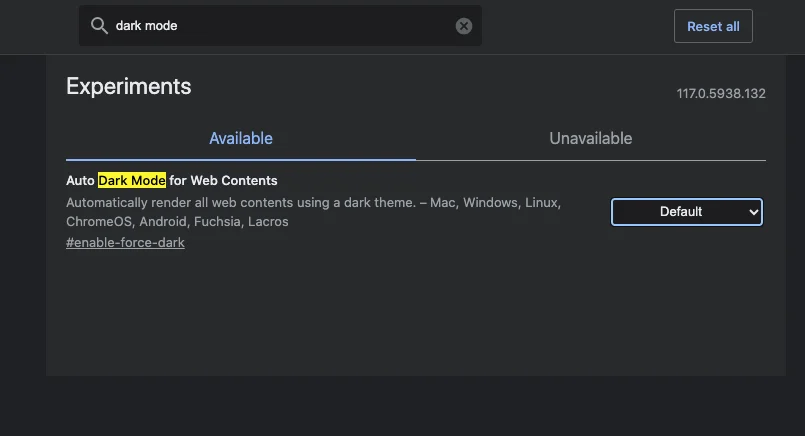
As you can see, there is a flag called “Auto Dark Mode for Web Contents”. Tap to the default menu of the flag.

Multiple options are available for enabling dark mode for all the contents of the browser. Tap on the enable button and relaunch your Chrome browser. Now visit any of your favorite websites. You will see the dark interface is enabled on that website.

By the way, Chrome has numerous dark themes for the appearance of the whole browser. Just visit the Chrome web store and search for the dark interface.
If you run a WordPress website and want to enable dark mode without writing code, using a plugin can be the easiest solution.
For example, tools like Darklup allow you to convert your entire website into a dark theme automatically while giving visitors a toggle switch to switch between light and dark modes.
You can learn more about it here: https://darklup.com/
You can also explore our detailed guide on enabling dark mode in WordPress here: https://darklup.com/how-to-enable-dark-mode-in-wordpress/
➕ Advantages of Using Dark Mode on Your Device
We have successfully shown you the process of turning on the night mode on any website. Aren’t you curious to know about the major benefits of using it? In this section, we are going to discuss the major benefits of using dark mode. Let’s explore more about the dark interface.
Helpful for your Eyes
We are living in a new era of modern technology. We spend the majority of our days in front of devices like smartphones, desktops, and laptops. As a result, it creates digital eye strain-related problems.
Now it’s impossible to stop using these devices suddenly. Because we often do our daily life tasks on smartphones and laptops. Where the dark mode helps us in very efficient ways. Because the dark mode reduces the effect of blue light. When you enable the dark mode on your browser, it will create a low-light environment on the screen.
Researchers claim that low brightness is highly efficient in reducing digital eye strain-related issues.
“To reduce glare, consider a matte screen filter for your device. Adjusting the brightness and contrast of your screen and dimming the lighting near your screen can also help reduce eye strain.”
– American Academy of Ophthalmology
Here are some tips that will help you to reduce eye strain.
- Use proper lighting: Avoid glare and harsh reflections on your screen by positioning your monitor away from direct light sources.
- Maintain proper screen distance: Keep your screen at eye level and about arm’s length away from your eyes.
- Blink frequently: Blinking helps moisten your eyes and reduce dryness. Be conscious of blinking regularly.
Save your Device Battery Life
Nowadays battery draining issues are a huge factor for devices like smartphones, laptops, and desktops. However, the manufacturer companies continuously present new technology to save battery life.
The dark mode feature is highly effective in reducing the battery consumption rate for devices like smartphones, laptops, and new-generation computers. However, the saving capability depends on a specific factor.
Dark mode saves the battery life on the OLED displays. It doesn’t work on the regular LED display. Once smartphones and laptops were only built with LED panels. However, the OLED panel is the updated version of the LED display.
Most of the new generation devices contain OLED technology devices. So the dark interface can be an effective option for those devices.
Improve your Focus and Readability
Hey, are you an online reader? Do you love to read your favorite books, comics, or magazines on your favorite laptop or smartphone? Then the dark interface can be a friendly companion for you.
Because the dark interface is highly efficient to improve the readability of the website text. Basically, it turns the background of the website into dark. Creates a low-light environment and improves the contrast of the text.
So the text becomes more readable for the audiences. Besides that, the dark interface also improves the focus of the reader. When you read any content on a dark interface, you can understand the difference.
Along with the dark interface, there are some tips that I can share with you about improving the readability of the website content. If you are a website owner, you can follow these tips. I hope this will help you in the long run.
- Increase the font size of the text.
- Use multiple bulleted points.
- Write the contents in short paragraphs.
- Include relevant images on the website content.
- Write the content in a very easy-to-understand tone.
Enhance Sites Aesthetics
Which factor do you notice first, when you visit a website? We can tell your answer is the overall design of the site. Visually appealing things always attract us as human beings. You can never deny that.
Especially looks matter for any kind of website. Maybe you have lots of high-quality products or content on your website. But rubbish or unorganized looks can ruin the value of the site. Now what you should do?
You must understand the demands of your audience. Then you have to implement a proper design based on that. We can’t say the regular colorful website design is bad. Along with the core design, you must have an option for the dark interface for it.
Those who love current website design don’t have to switch to dark mode. The dark interface adds a minimalist and modern look to the site. So your website looks more premium and visually appealing.
Because of these benefits, many modern websites and applications now provide a built-in dark mode option to improve user comfort and accessibility.
Frequently Asked Questions
Q1. Can every website support dark mode?
Most websites can support dark mode through browser settings, extensions, or theme adjustments. WordPress websites can enable dark mode easily using plugins that automatically convert the site’s design into a dark theme.
Q2. Does dark mode improve website accessibility?
Dark mode can improve accessibility for users who experience eye strain or light sensitivity. It also helps people browsing in low-light environments and can improve readability for certain users.
Q3. How do I add a dark mode toggle to my website?
A dark mode toggle can be added using CSS and JavaScript or by installing a WordPress plugin that provides a built-in dark mode switch for visitors.
Final Thoughts
Adding a dark interface on any website is easier than you think. You already understand that throughout our full-fledged guided process. You just need the Chrome browser on your computer or laptop. Then just follow the full process,and you will make it faster than ever. However, if you want to enable dark mode on your WordPress site, you can choose the best dark mode plugin called Darklup.